
Most of us are already using AI at work in one way or another. Maybe you ask ChatGPT to tidy up an email, summarise a meeting, research a company, analyse a spreadsheet or help you get unstuck when you’ve been staring at the same problem for too long.
And it’s useful. Really useful, in some cases. But there’s still one thing you have to do every single time: remember to ask.
You have to notice that something needs doing, open the AI tool, explain what’s going on, give it the right context and tell it what you want. Once it gives you an answer, you then decide what needs to happen next. So while AI might make one part of the task much faster, you’re still the one keeping the whole process moving.
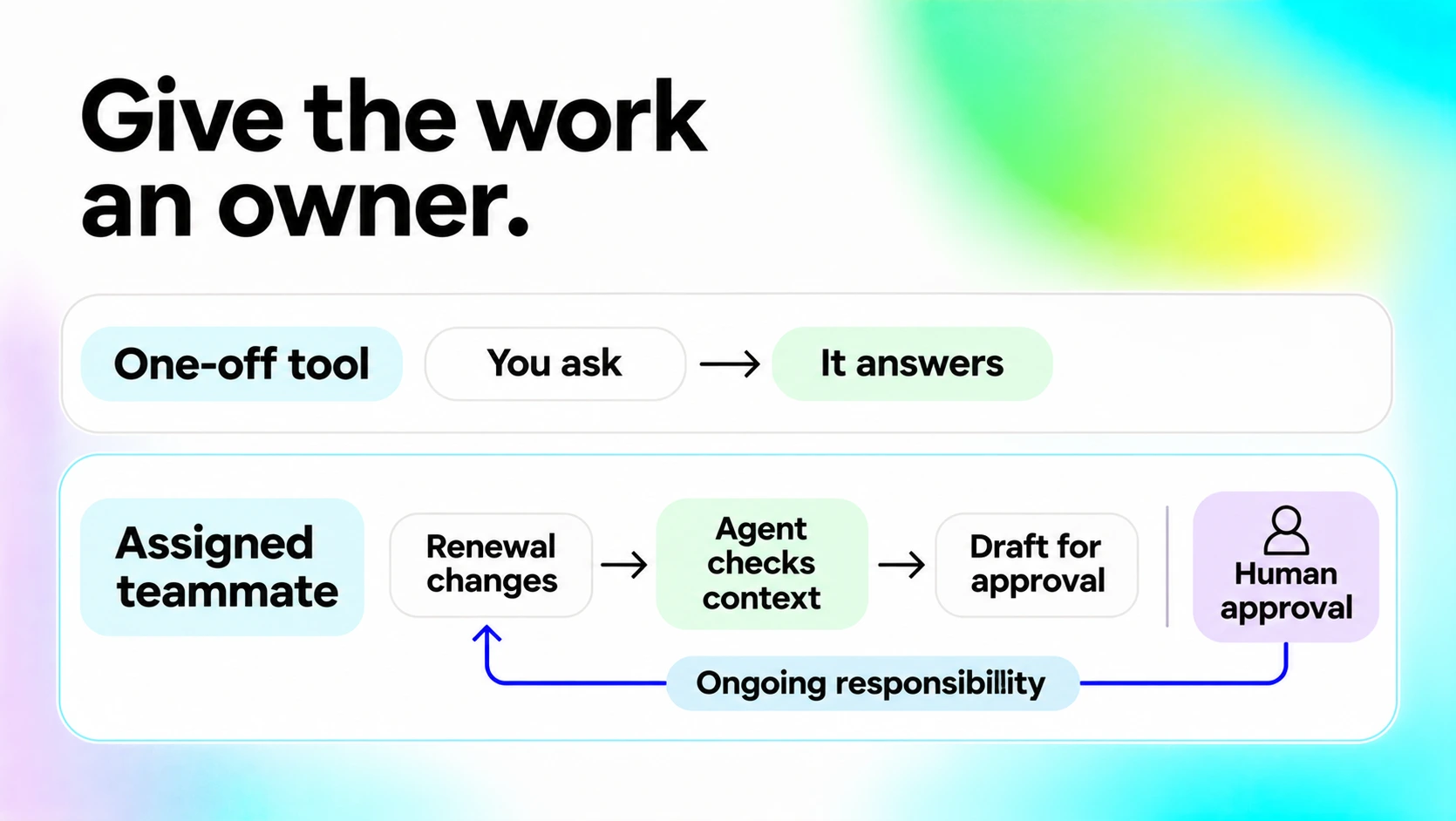
That’s where the difference between an AI tool and an AI teammate starts to get interesting. An AI tool helps when you use it. An AI teammate understands the role it has been given, the context around that role and what it is responsible for, so it can help move work forward without waiting for you to prompt it every step of the way.
AI tool vs AI teammate: what’s actually different?
Most AI tools today are reactive. You ask them to do something, and they respond. You might ask an AI assistant to summarise customer notes, write a follow-up email, analyse a spreadsheet or prepare questions for your next meeting. It can often do those things incredibly well and save you a fair amount of time along the way.
Don’t get us wrong, this isn’t necessarily a problem. Sometimes you just want help rewriting an awkward email or making sense of a messy spreadsheet. You don’t need the AI to understand your whole business before it can help.
The limitation starts to show when you want AI to support ongoing work. Imagine one of your customers suddenly starts using your product much less than usual. A traditional AI tool won’t notice unless somebody tells it to look.
An AI teammate works differently. Instead of starting with a one-off prompt, it starts with a role and a set of responsibilities. You might tell an AI teammate that its job is to help your Customer Success team spot accounts that need attention. Depending on what you give it access to, it could look at customer activity, support conversations, account notes and upcoming renewals, then surface something worth looking at.
For example:
“Usage at Acme has dropped significantly this month and there are two unresolved support conversations from last week. Their renewal is also coming up soon. I’ve pulled together the latest account activity. Would you like me to prepare a summary for your next call?”
You didn’t ask a clever question or write the perfect prompt. The AI understood that something relevant to its responsibility had happened and knew it was worth bringing to your attention.
| AI tool | AI teammate |
|---|---|
| Waits for you to ask | Can notice when something relevant happens |
| Responds to individual tasks | Works around an ongoing responsibility |
| Relies heavily on context you provide | Can use context from connected business systems |
| Often handles one interaction at a time | Can follow work across multiple steps |
| Gives you an answer or output | Helps move the work forward |
| Needs you to decide what to check | Can surface what needs your attention |
| Often starts again with every new conversation | Understands its role and relevant context |
| You operate the AI | You delegate parts of the work |
That doesn’t mean every AI tool needs to become an AI teammate. There are plenty of occasions where you just want to ask AI a question and get an answer … and that’s totally fine! But if you want AI to take on part of an ongoing business process rather than just help with individual tasks, the difference starts to matter a lot more.
The real problem with prompt-based AI at work
A lot of the conversation around AI productivity focuses on how quickly AI can complete a task. Can it write this email faster? Can it summarise this report? Can it analyse this dataset?
Those things matter, but they’re only one part of how work actually happens. Quite often, the bigger challenge is knowing that something needs doing in the first place.
A customer hasn’t replied.
A deadline has moved.
An important account has become less active.
A support case is getting worse.
A large sales opportunity has been sitting in the same stage for weeks.
A project is blocked because someone is waiting for information.
None of those situations begin with a neat prompt waiting to be typed into ChatGPT. They begin with something changing somewhere in the business. And somebody has to notice.
In practice, the workflow often looks more like this:
Notice something → gather the context → figure out what it means → decide what to do → ask AI for help → review the answer → take action.
Traditional AI assistants tend to help somewhere in the middle, but an AI teammate can potentially help across much more of that process. And this is the bit that matters: the biggest opportunity for AI at work might not be doing individual tasks faster. It might be reducing how much people have to remember to do in the first place.
Role and context are what change the game
If you use AI regularly, you’ll probably know the routine: “For context, this customer is…” or “Here’s what happened last week…” or “Our process normally works like this…”
We spend a lot of time briefing AI before it can actually help us. That’s understandable with a general-purpose AI tool, because it doesn’t automatically know what’s happening inside your business. But can you imagine working with a colleague like that? Every morning they turn up having forgotten their role, their customers and what happened yesterday. Before you can delegate anything, you have to explain the whole situation again.
For AI to become genuinely useful as a teammate, it needs access to the context that matters to its job. That might come from your email, CRM, calendar, project management tools, support platform or internal documentation.
But access alone isn’t enough. The AI also needs to understand why that information matters, and that comes down to its responsibilities.
Take a weekly sales report. You could ask an AI tool:“Create our weekly sales report. That’s a clear task, and the AI may do it very well.
Now compare that with giving an AI teammate a broader responsibility: “Help the sales team understand what changed this week and what needs attention.”
Maybe overall pipeline looks normal, but Germany is down 12%. The AI looks a little closer and finds that two large enterprise deals have moved into next month. Instead of sending another dashboard for someone to interpret, it could surface the reason and pull together the relevant account notes.
That’s much closer to how delegation works between people. You don’t usually tell a good colleague every single click they need to make. You give them responsibility for an area and expect them to understand what deserves attention.
What about human control?
An AI teammate doesn’t need to mean giving AI unlimited freedom. In fact, the most useful setup will usually sit somewhere between “AI does nothing unless I ask” and “AI does whatever it wants.”
An AI teammate might be allowed to monitor information, investigate changes, gather context, prepare work and suggest a next step on its own. More sensitive actions can still require human approval. Maybe the AI can draft a customer email but needs approval before sending it, or it can identify CRM records that should be updated but waits for confirmation before making the change. It might investigate why a metric moved, but bring the conclusion to a manager rather than making the business decision itself.
The level of autonomy should depend on the job, and that’s not particularly different from working with people either. You give different teammates different levels of responsibility depending on the task, the risk involved and how much oversight makes sense. Human control and proactive AI don’t have to be opposites.
What could an AI teammate actually do?
The idea makes more sense when you stop talking about “AI agents” in the abstract and look at what a normal working day could actually look like.
Customer Success
A Customer Success teammate could keep an eye on customer activity rather than waiting for a CSM to manually investigate each account. If product usage drops, support issues start piling up or a renewal is approaching, it could pull together the relevant context and bring it to the account owner. The CSM still decides what to do about it. They just don’t have to spend as much time hunting for the signal first.
Sales
A sales AI teammate might help prepare for upcoming calls by gathering account information, previous conversations and relevant updates before the meeting. Afterwards, it could pick up follow-up actions from the notes, prepare an email or flag that a next step still hasn’t been scheduled. The salesperson is still building the relationship and having the conversation. They just spend a little less of their day doing admin around it.
Operations
Operations teams often spend a surprising amount of time checking whether everything is running normally. An AI teammate could monitor parts of a workflow and surface the exceptions. If everything is fine, great. Nobody needs another notification telling them that. If something is stuck, missing or behaving differently than expected, the AI can bring it to the right person with the relevant context already attached.
Management
Managers can spend a lot of time gathering information before they can even start making decisions. An AI teammate could pull together updates from different systems, look for meaningful changes and prepare a short briefing focused on what actually deserves attention.
Not every number or every update, just the things that changed and might matter. The value isn’t in AI generating even more information. Most businesses already have more information than they know what to do with. The value is helping people work out what deserves their attention.
AI assistant vs AI agent vs AI teammate
This is usually where the terminology starts getting messy. You’ll hear people talking about AI assistants, AI agents, agentic AI, autonomous agents and AI teammates, sometimes to describe very similar things.
Broadly speaking, an AI assistant usually helps a person with a task, often through direct interaction. An AI agent can typically work towards a goal, use different tools and complete multiple steps with less direct instruction. An AI teammate can use many of those same underlying capabilities.
The difference for us is more about how you think about its role in the business. Instead of only asking, “How autonomous is this AI?”, we think it’s more useful to ask:
- What is it responsible for?
- What context does it need to do that job?
- What should it be paying attention to?
- What is it allowed to do on its own?
- When does it need to ask a person?
- Which decisions should always stay with a human?
Those sound a lot like the questions you’d ask when defining someone’s role on a team, and that’s kind of the point.
From prompting AI to delegating work
For the last few years, most of us have been learning how to use AI: how to write better prompts, choose the right tools and get better outputs. That still matters, but we think the more interesting question is becoming: what part of this work could I actually delegate?
We think the interesting shift isn’t from humans to AI. It’s from prompting AI to delegating parts of the work to it.
That’s what we’re building Lobu around: AI teammates with a role, relevant context, clear boundaries and a human still in control when it matters.


Hi, I’m Emre 👋
I’m the founder of Lobu. We’re building AI teammates that understand their role, have the context they need and help move work forward without waiting for another prompt.
I started Lobu because I think AI should feel less like another tool you have to manage and more like a teammate you can actually delegate to.
See what we’re building at Lobu →Want to follow along with what we’re building? Connect with me